Skip to content

alphaDSF 2 · Revised SYSCOHADA · SYCEBNL

Build and generate your DSF in the Excel upload format in 5 min.

Paste your trial balance. alphaDSF does the rest, automatically.

See how

Version 2.0.1 · Windows 10 and 11 · 111 MB

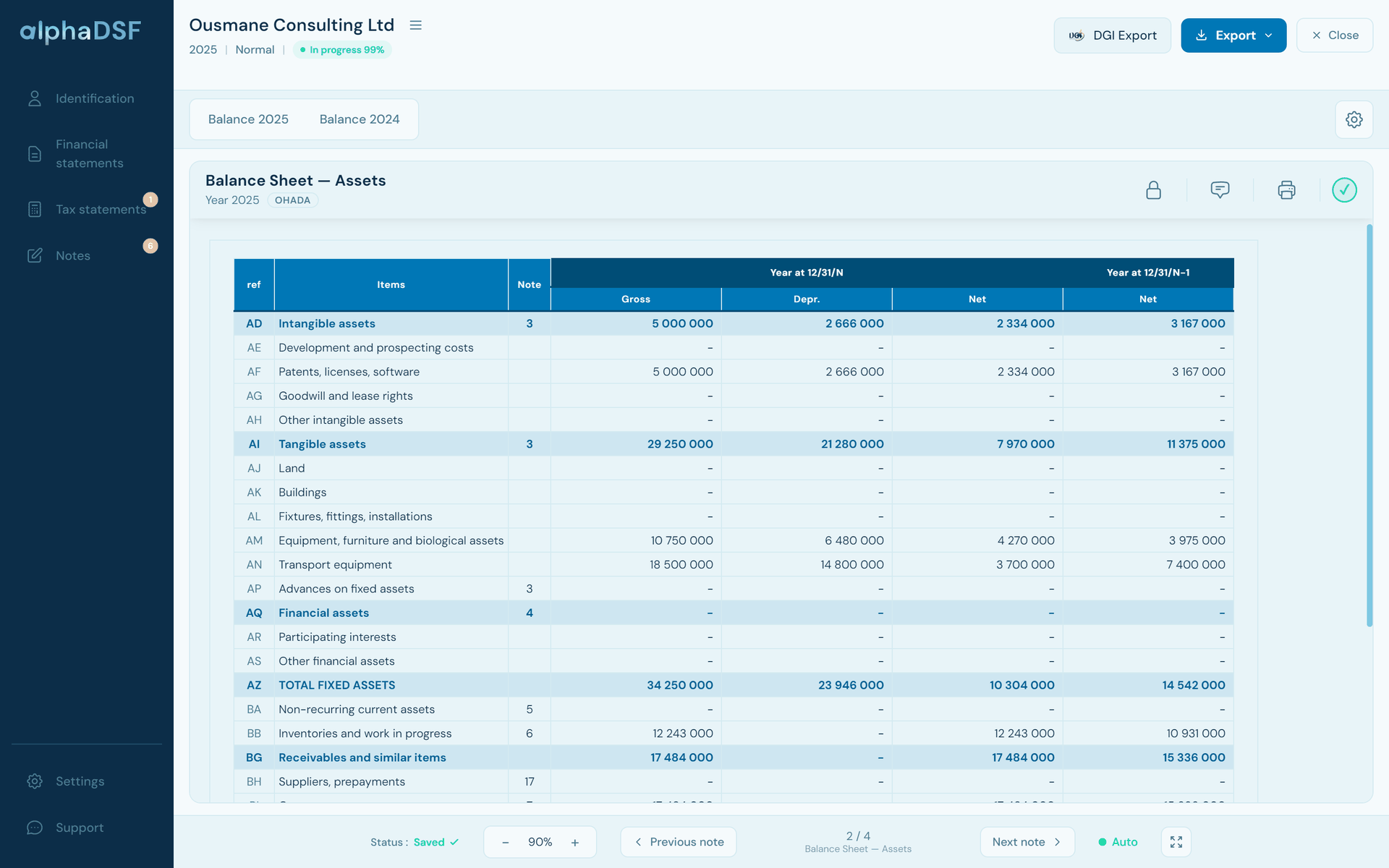
Balance sheet assets computed by alphaDSF from the trial balance: fixed assets, depreciation and net amounts for the year
Balance sheet of the fictitious file “Ousmane Consulting Ltd”, as shown in alphaDSF.

All in one

One software for companies and non-profit entities.

Convert your DSFs in a few clicks: a normal DSF converts into an association DSF, an SMT or other types of file. The original file stays intact.

17
OHADA countries
7
types of files
70+
notes and statements computed
0
accounting data sent over the Internet

In just 4 steps, in about 5 minutes, your DSF is consistent and ready to file

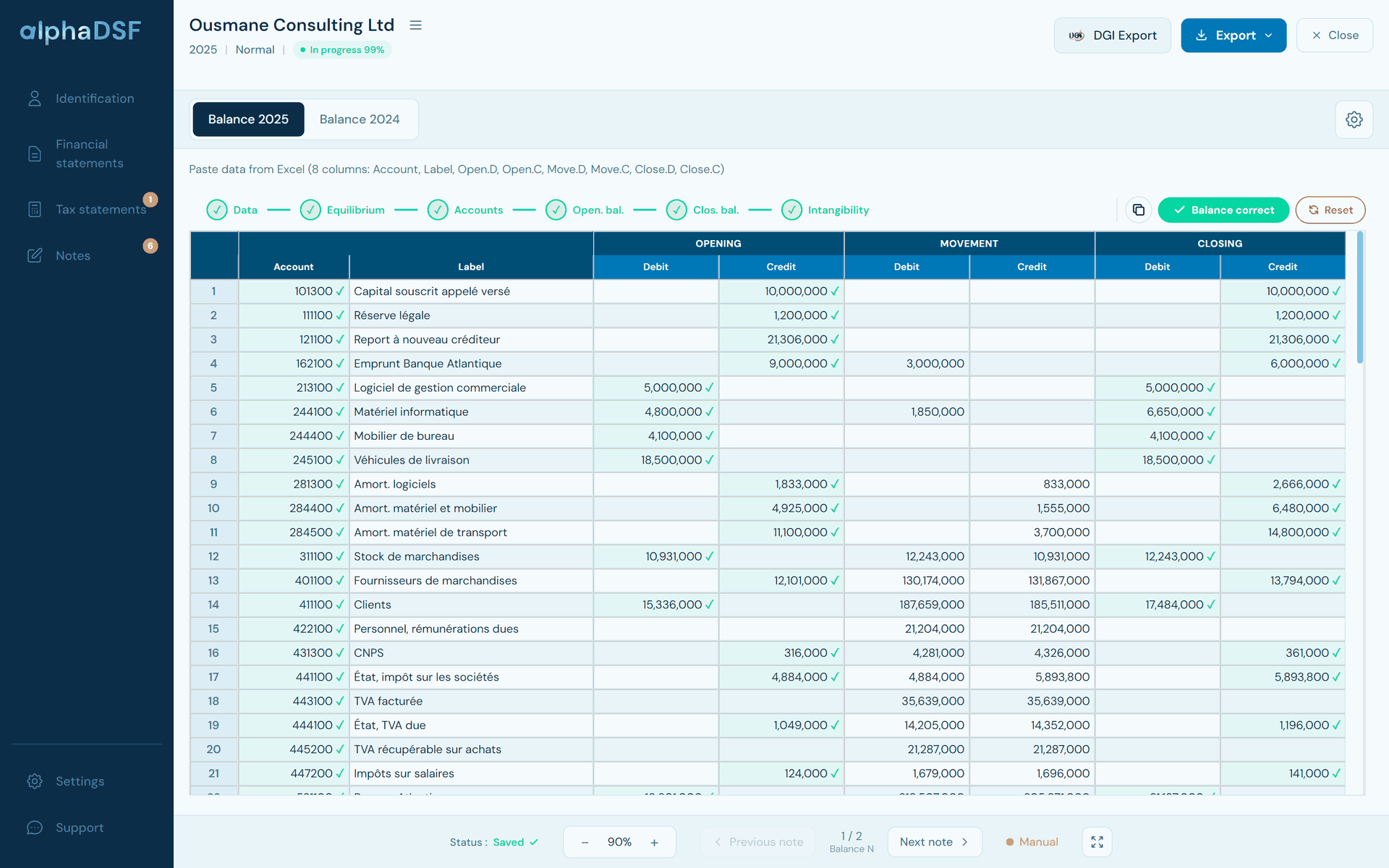
  1. Current-year trial balance pasted into alphaDSF: accounts, labels, opening balances, movements and closing balances
    1

    Paste your trial balance

    One copy and paste from your accounting software or Excel, for the current and prior-year trial balances. The trial balance is analysed at once, with no action on your part, and an assistant guides you to correct any errors.

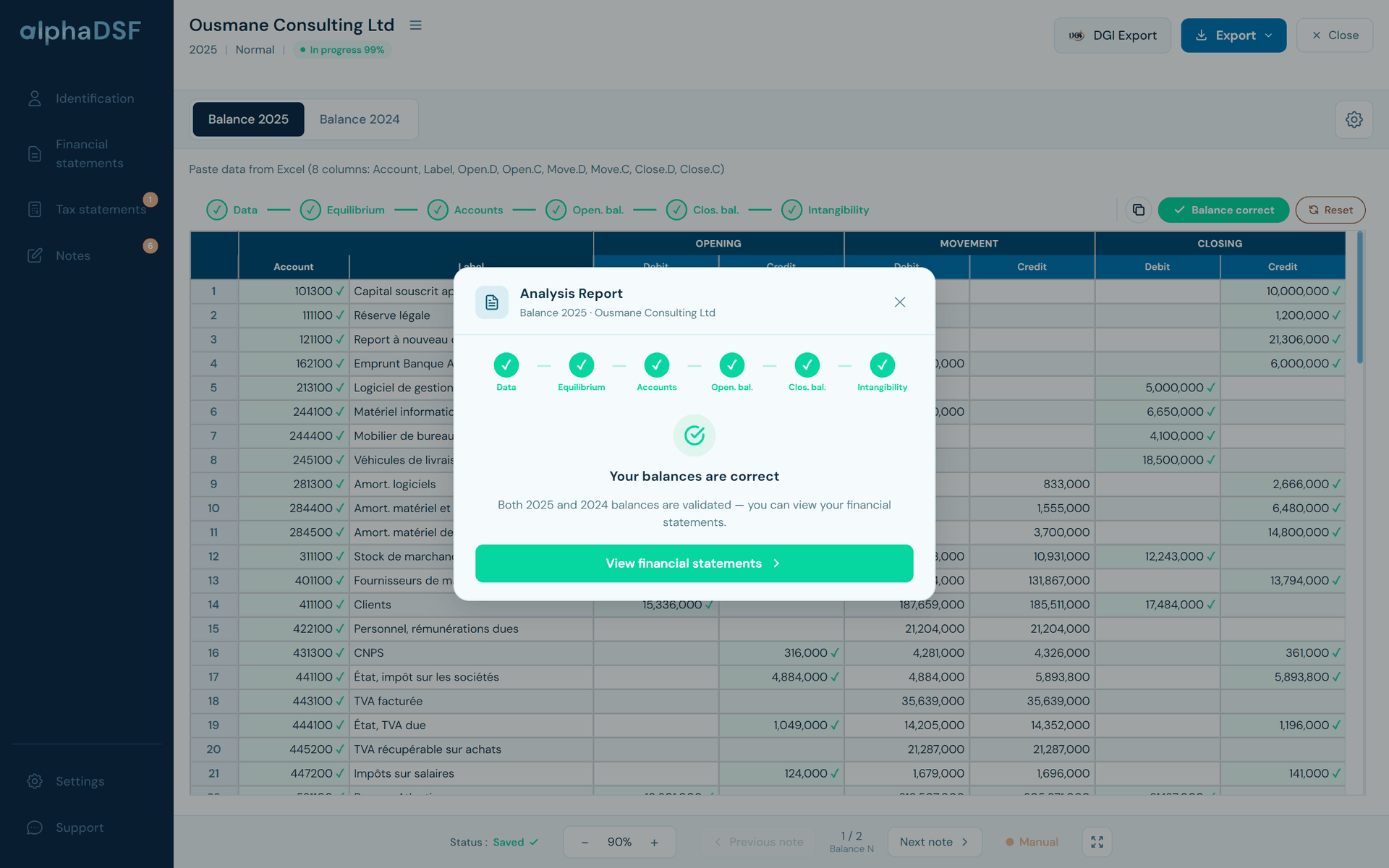
  2. alphaDSF analysis report: the six trial balance checks are passed
    2

    Every account is checked

    Every account is checked against the chart of accounts of the revised SYSCOHADA or the SYCEBNL, then analysed according to how it works: balance direction, debit-credit balance, consistency with the prior year closing. Your financial statements thus start from a trial balance that complies with OHADA.

  3. Balance sheet assets computed by alphaDSF: gross, depreciation and net, current and prior year
    3

    Your return is ready to review

    Balance sheet, income statement, cash flows, notes and tax statements are calculated automatically, and every cell gives you its precise breakdown.

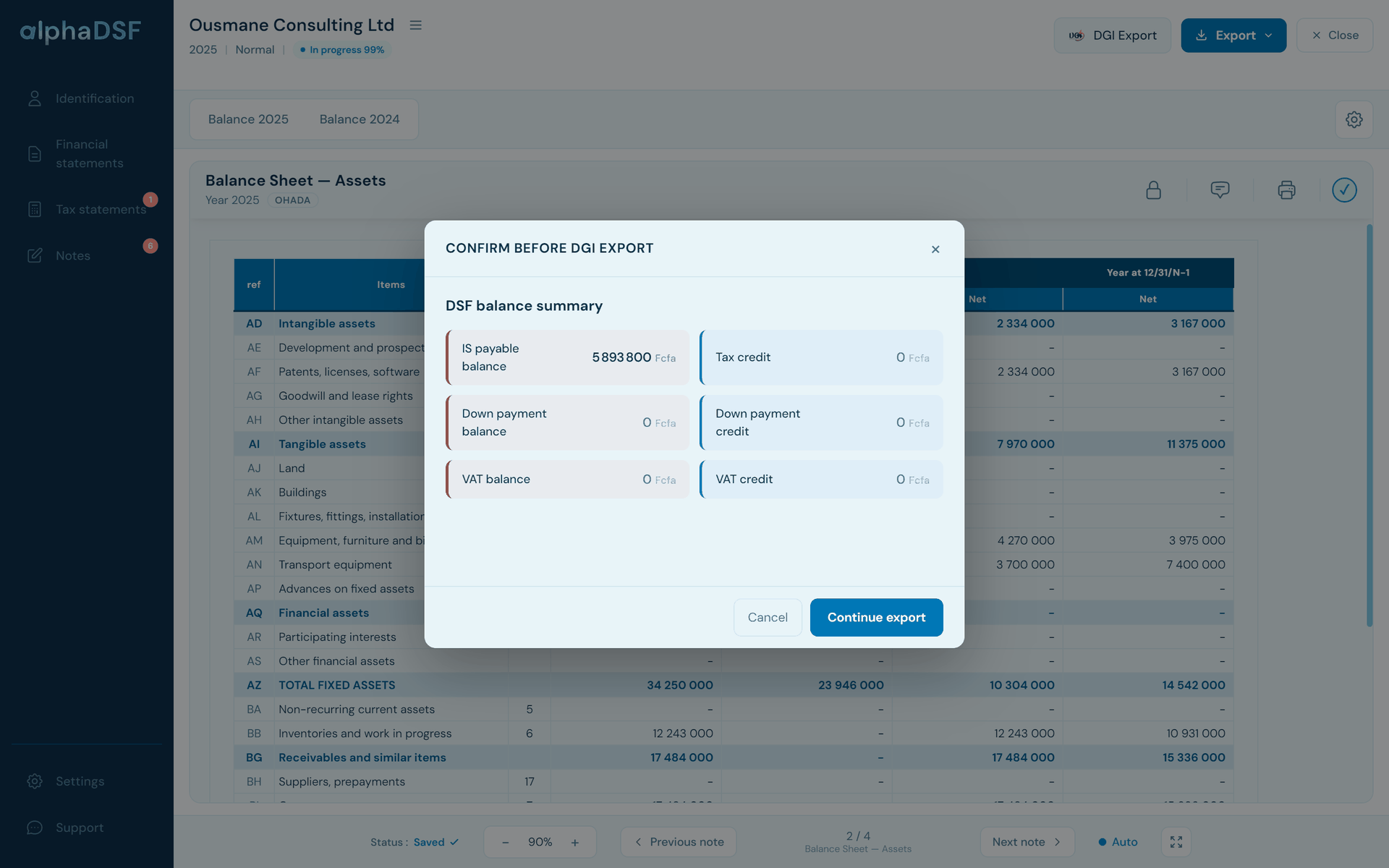
  4. Confirmation before the DGI export in alphaDSF: tax payable and credits summarised
    4

    Export for the DGI

    The Excel file in the official DGI format, ready to upload, and the PDF return for printing. We update the application every year as the DGI format and the law evolve.

Discover alphaDSF

Real screenshots of the application, on a fictitious file.

All your DSFs in one application: find them, sort them and filter them by type of file, by year and more.

  • Search by company or by file name
  • Filters by status, type of file, period or financial year, and tag
  • A to Z sorting and the progress of each DSF as a percentage
  • “My companies”: DSFs grouped by company (tax number), year by year
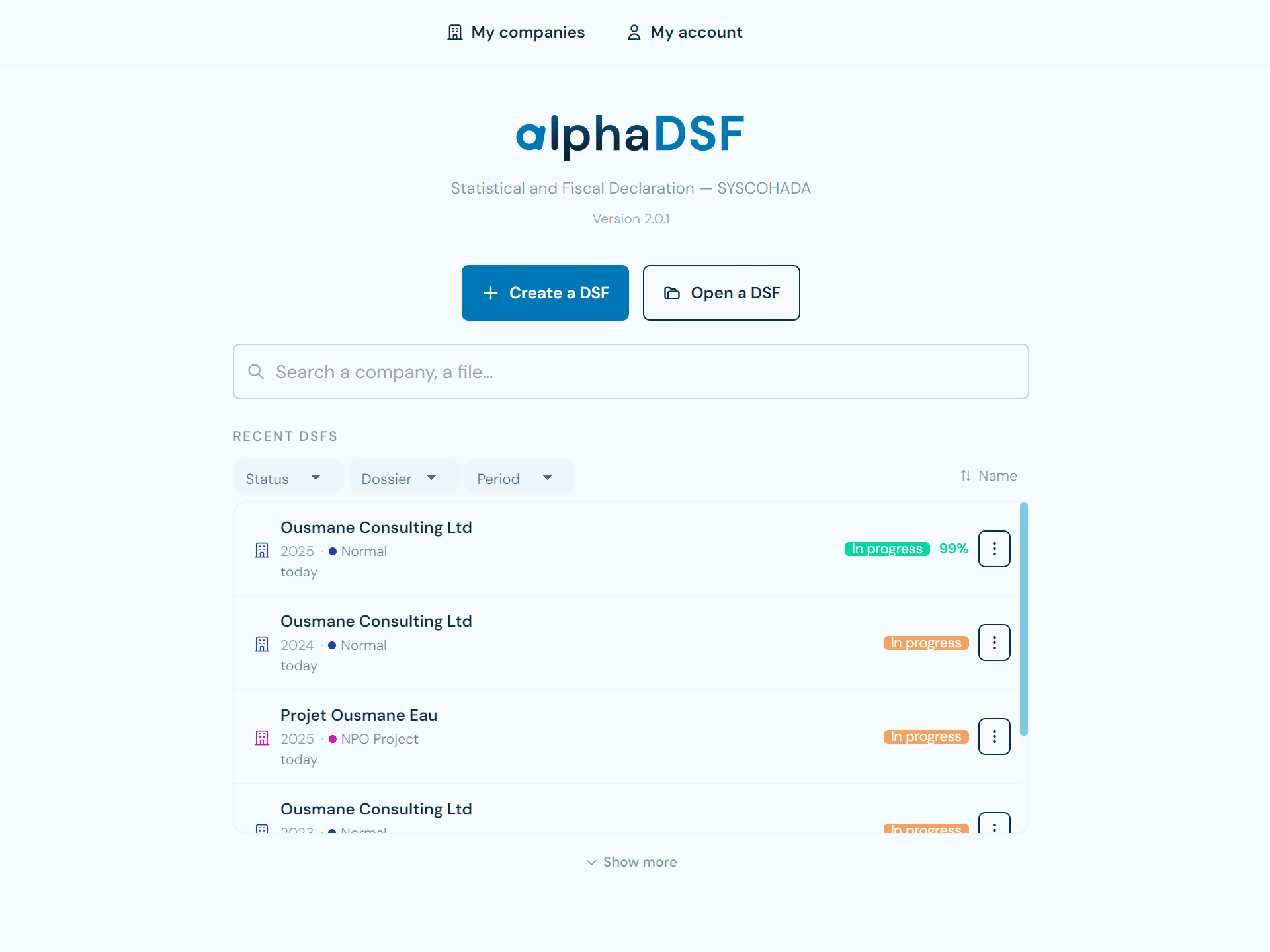
alphaDSF home screen: recent DSFs with filters by status, type of file and period, sorting and progress percentage

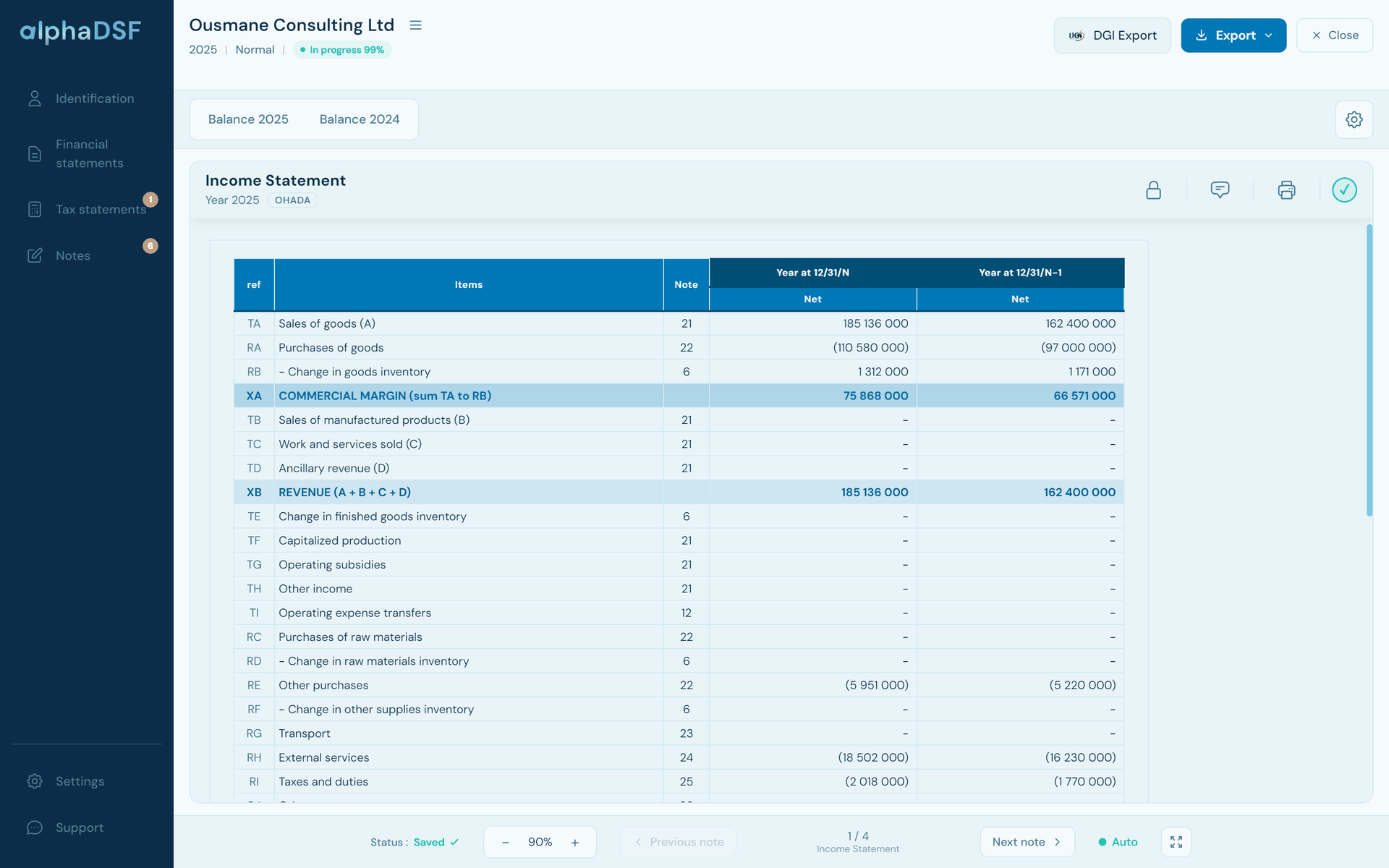
Every line is computed from the trial balance under the revised SYSCOHADA rules, for the current and prior year: balance sheet assets and liabilities, income statement with its intermediate balances, cash flow statement reconciled with the balance sheet cash. Click an amount to see the accounts behind it.

SYSCOHADA income statement computed by alphaDSF: sales, purchases, gross margin and revenue, current and prior year

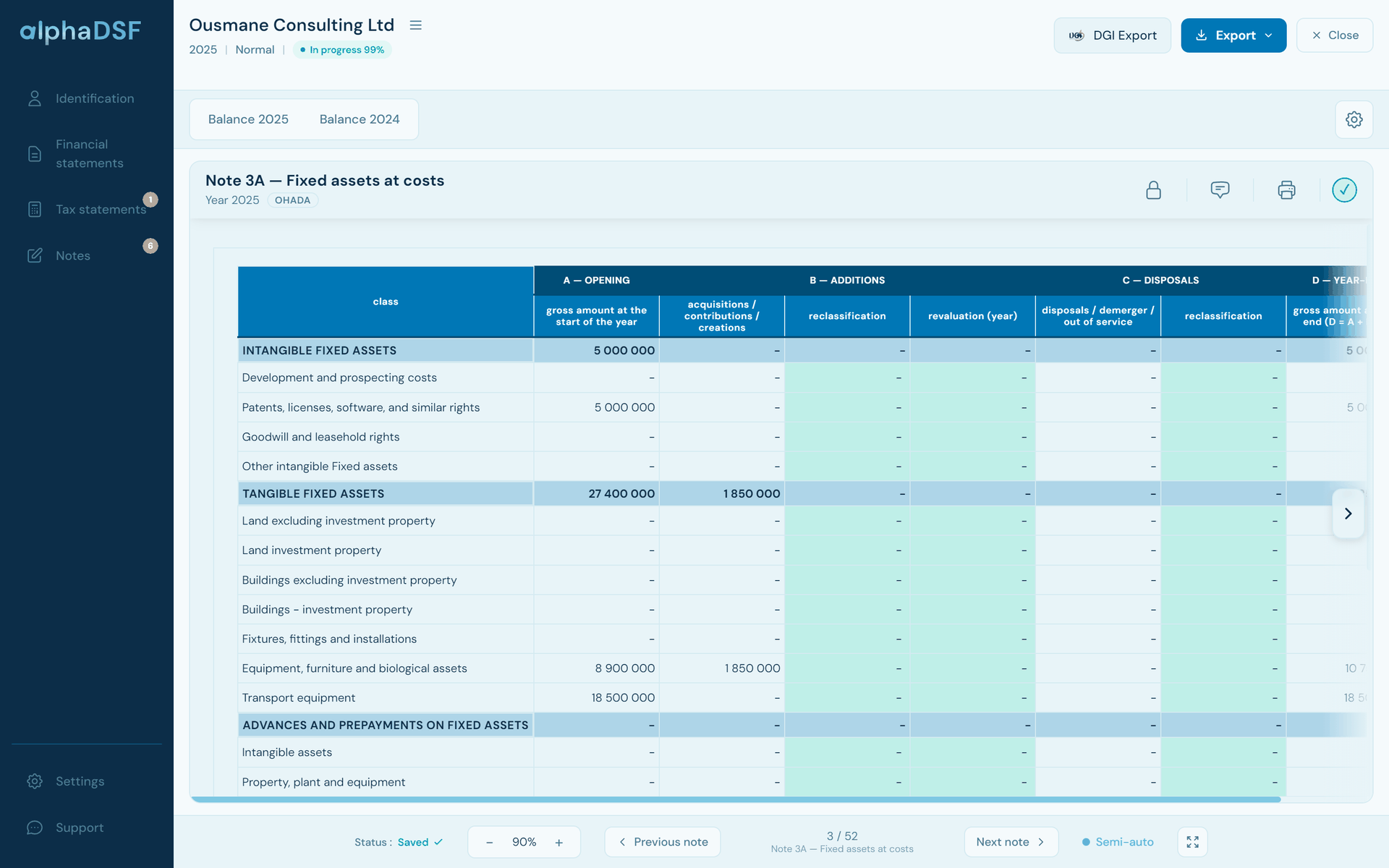
Fixed assets, depreciation, inventories, receivables, payables, staff: the notes take their figures from the trial balance and the financial statements. Cells to complete are in green; consistency rules show what is missing before filing.

Note 3A “Fixed assets at cost” in alphaDSF: amounts taken from the trial balance, cells to complete in green

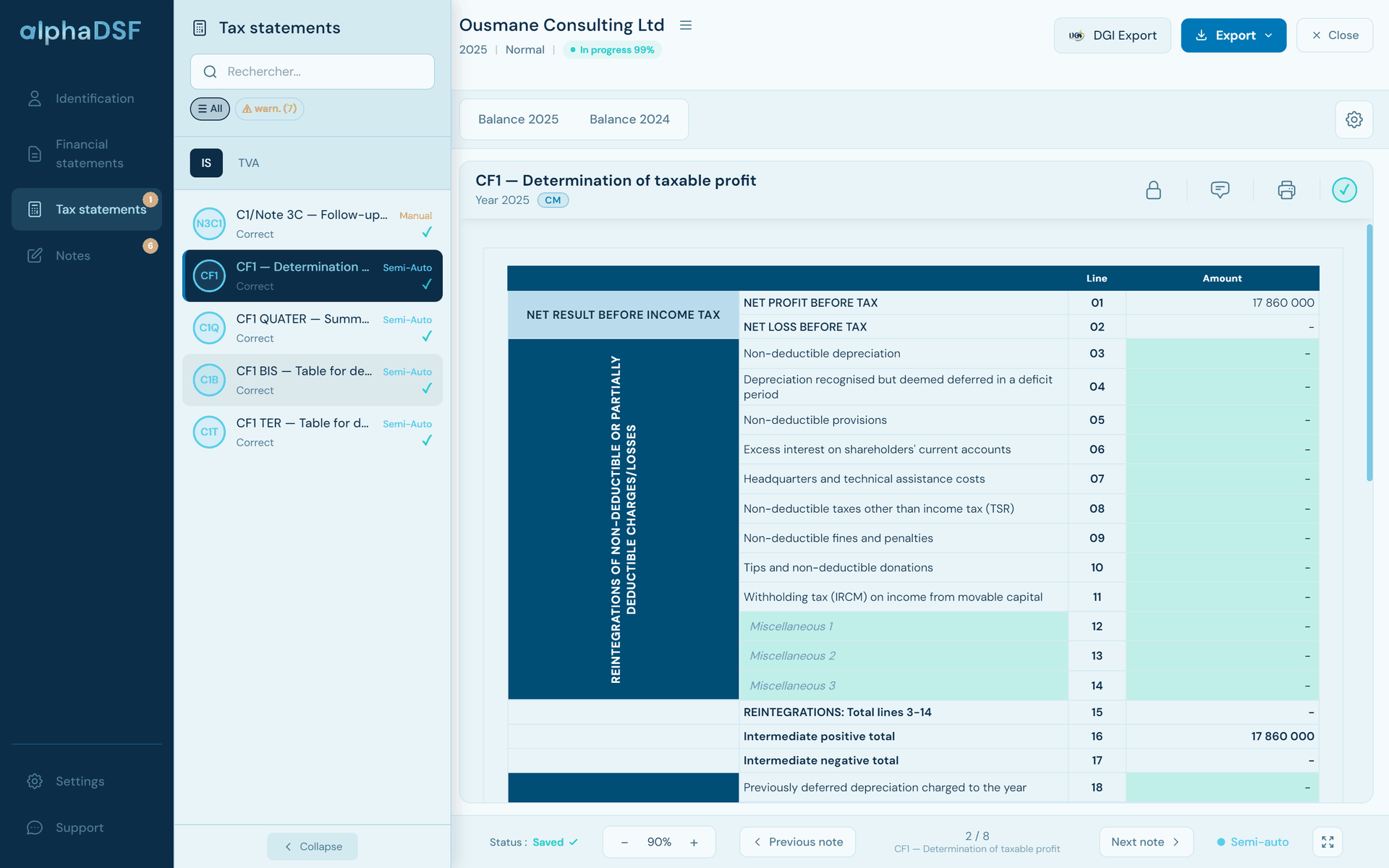
From accounting profit to taxable profit (CF1), corporate income tax and minimum tax (CF1 bis, CF1 ter), summary and VAT position. Amounts come from the trial balance and the statements: you add the add-backs and deductions.

alphaDSF tax statements: list of the CF1 to CF1 ter forms and the CF1 table from accounting to taxable profit

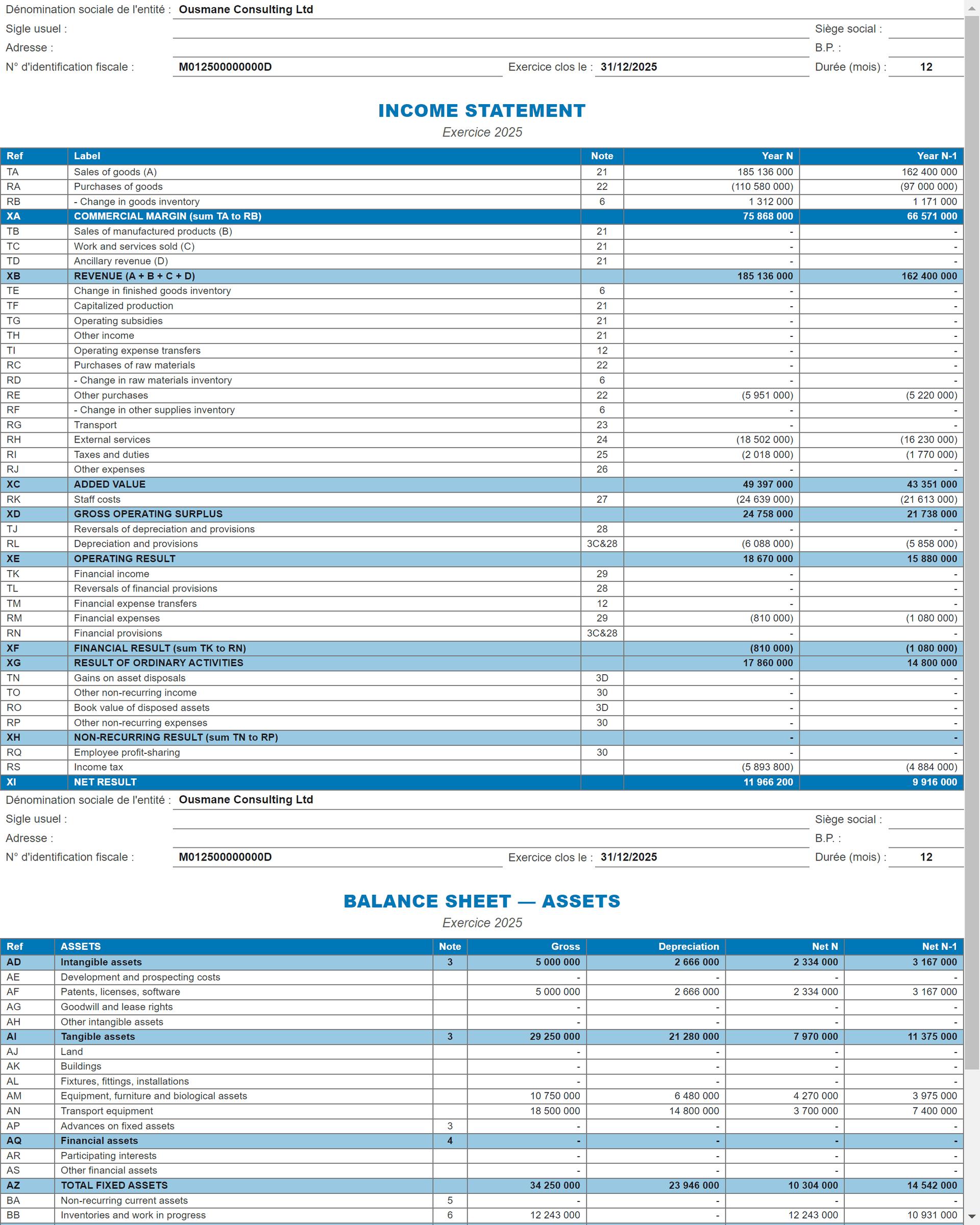
The alphaDSF interface is in English or French. When printing, the labels of the financial statements, notes and tax statements come out in English or French, chosen for each DSF. The DGI file follows the official template.

Print preview of the income statement in English in alphaDSF

Financial statements are sensitive.

That is why alphaDSF checks consistency and integrity at every step. You always know what is left to do.

  • Each note shows its status: correct, in progress or in error
  • A percentage tracks the DSF, from the trial balance to the notes; at 100 %, everything is right
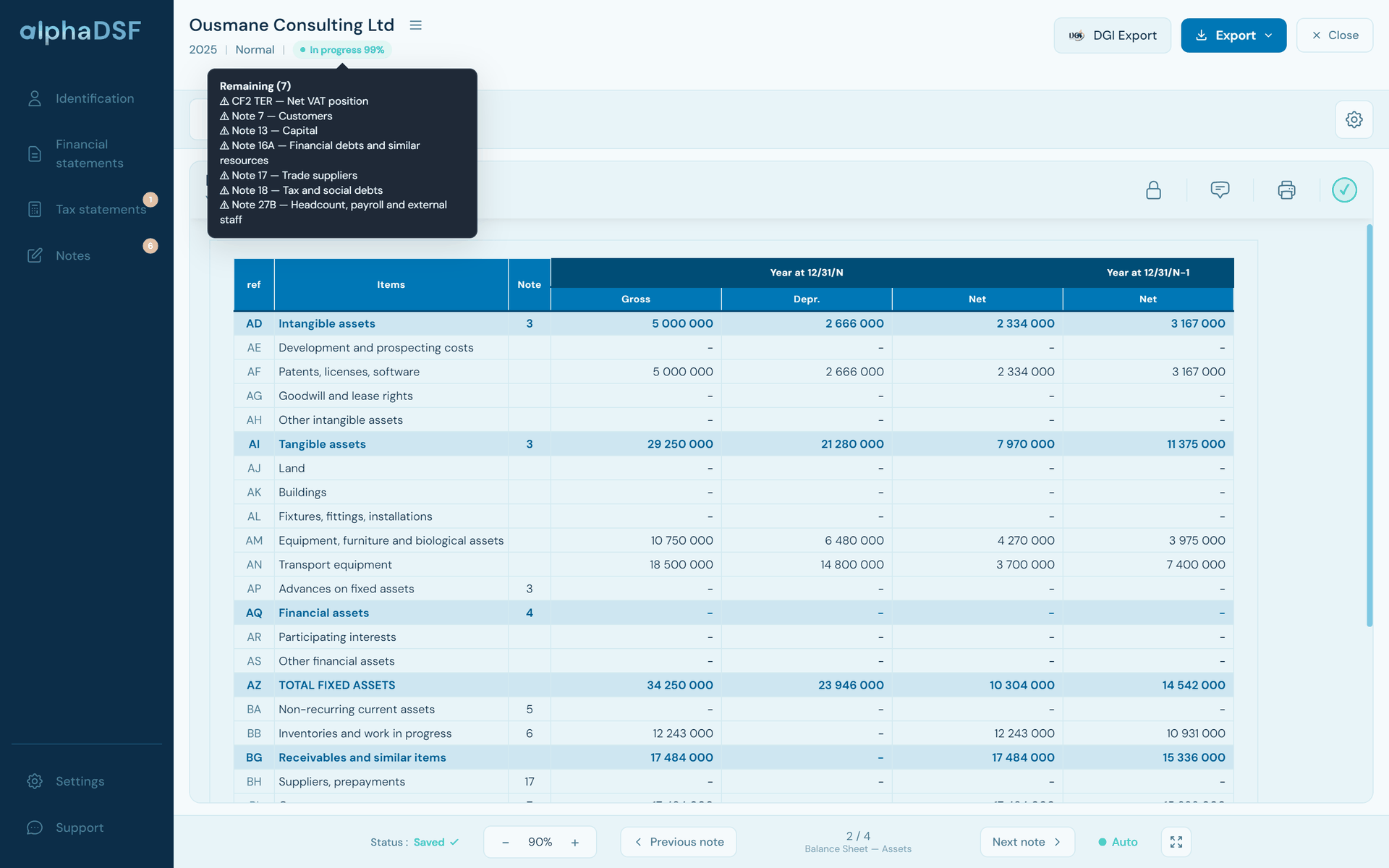
  • The “Remaining” list names the notes to complete, one click takes you there
alphaDSF “Remaining” list: DSF in progress at 99 % and the notes still to complete

Privacy

Your figures stay on your computer

alphaDSF installs on Windows and works without the Internet. DSF files are encrypted and saved wherever you choose. No trial balance and no financial statement is ever sent to a server.

Encrypted files
One .dsf file per company and per year
Works offline
Internet for activation; your DSFs are prepared without a connection
Built-in support
In-app messaging and WhatsApp
Updates
New DGI formats installed automatically

All your files, in the 17 OHADA countries

Companies, associations, NGOs and projects: each type of file has its own statements, notes and rules, compliant with the revised SYSCOHADA and SYCEBNL.

Standard system

Companies under the actual-profit regime: full statements, notes and tax.

Regulated margin

Activities with a regulated margin.

Oil sector

Petroleum product distribution, with its own statements.

Minimal cash-based system (SMT)

Small businesses: cash journal, simplified balance sheet and income statement.

Associations and NGOs (SYCEBNL)

Non-profit entities, under the standard or minimal system.

Development projects

Sources and uses statement, budget execution, donors.

An application compatible with all 17 OHADA countries

  • Benin
  • Burkina Faso
  • Cameroon
  • Central African Republic
  • Comoros
  • Congo
  • Côte d'Ivoire
  • Gabon
  • Guinea
  • Guinea-Bissau
  • Equatorial Guinea
  • Mali
  • Niger
  • DR Congo
  • Senegal
  • Chad
  • Togo

The file in the DGI format is available for Cameroon.

Three licences, to suit your activity

Choose according to the number of DSFs you prepare each year.

Pack

For a few DSFs a year

Price on request

  • A number of DSFs chosen at purchase
  • Valid for 12 months from activation
  • Updates and support during that time
  • DGI file export and PDF return
  • Import of your alphaDSF Excel workbooks
Ask for the price on WhatsApp
Recommended

Unlimited

To use it with no time limit

Price on request

  • Unlimited DSFs, with no time limit
  • All your client companies
  • 2 years of maintenance included
  • Computer release: 3 per year
  • Conversion between the files you bought
  • Information carried over from one year to the next
Ask for the price on WhatsApp

Annual

For accounting firms and accountants

Price on request

  • Unlimited DSFs for 12 months
  • All your client companies
  • Updates and support included during that time
Ask for the price on WhatsApp

For all three licences: one type of file in one country, more types of file can be added to the same licence; alphaDSF works offline and your files are encrypted.

Support and maintenance: you are never on your own

You prepare your DSF, we take care of the rest. When the DGI changes its formats or the law evolves, alphaDSF is updated; when you have a question, we answer you on WhatsApp. The first two years are free. After that, the annual maintenance lets us keep doing this work alongside you: every update and every answer takes time, and that time is what you fund.

Frequently asked questions

What is the DSF?

The DSF (Déclaration Statistique et Fiscale, statistical and tax return) is the annual file that companies and organisations in the OHADA area file with the tax administration: SYSCOHADA financial statements (balance sheet, income statement, cash flow statement, notes), tax statements and identification forms.

What exactly does alphaDSF do?

alphaDSF starts from the current and prior-year trial balances, checks them, computes the balance sheet, income statement, cash flow statement, notes and tax statements, then produces the Excel file in the DGI format and the PDF return.

Which licence should I choose?

It depends on your needs and on how many DSFs you prepare.
Pack licence: a few DSFs in the year, a number set at purchase, valid for 12 months.
Annual licence: unlimited DSFs for 12 months, for firms with many clients.
Unlimited licence: unlimited DSFs with no time limit; the best value if you use alphaDSF for several years.
Not sure? Write to us on WhatsApp and we will advise you.

Do I pay every year?

Not for the Unlimited licence: you pay for it once. What is paid every year, after the two free years, is support and maintenance. The reason: DGI formats and tax law change, alphaDSF has to evolve with them, and we have to keep you able to work. The Pack and Annual licences are valid for 12 months, support and updates included; you renew them for the next year if you need to.

What does the price depend on?

The price depends on three things: the licence you choose (Pack, Annual or Unlimited), the modules you buy (each type of file in a country: normal, SMT, association, development project…) and the number of computers alphaDSF is used on. Ask for your price on WhatsApp.

Is alphaDSF available in English?

Yes. The interface is in English or French. When printing, the labels of the financial statements, notes and tax statements come out in English or French, chosen for each DSF. The DGI file follows the official template.

Do I need the Internet to use it?

No. alphaDSF installs on Windows 10 or 11 and works offline. The Internet is used to activate the licence, then for a check from time to time.

Is my accounting data sent over the Internet?

No. DSF files stay on your computer, encrypted. The licence server never receives your trial balances or financial statements.

Windows shows “Windows protected your PC”: what should I do?

Click More info, then Run anyway. This message appears for recent software that Windows does not know yet. Only download the installer from www.alphadsf.com. See the installation steps.

I used alphaDSF in Excel: can I bring my workbooks?

Yes. alphaDSF 2 turns an alphaDSF Excel workbook into a DSF file: trial balances, identification and notes are carried over. Former customers get special terms: write to us.

Why is my WhatsApp number requested for the download?

To help you: installation, activation, answers to your questions and new DGI formats. You only receive our offers if you tick the box for that. Your number is never sold or shared; write “STOP” to stop receiving offers.

Is alphaDSF available on Mac or on a phone?

alphaDSF installs on a Windows 10 or 11 computer. The macOS version is being prepared; there is no phone version. Leave your number: we will tell you when the Mac version is out, or send you the link for your Windows computer.
Prepare your next DSF with alphaDSF

Install it now: a demonstration and support are available on WhatsApp.

Download alphaDSF

Three quick answers, and the download starts.

1. Which licence are you interested in?
2. On which computer will you install it?

3. Your WhatsApp number
+237

Your number is used to help you: installation, activation and new DGI formats. Privacy

Version 2.0.1 · Windows 10 and 11 · 111 MB